- Home
- Troubleshooting
- Device owned by another user
Troubleshooting
Device owned by another user
Clear the ownership error — on Gen1 it usually means two devices share an ID.
Updated: August 2026
What the message means
The obvious reading is that you have bought a used device that someone else still owns. That is occasionally true, but it is not the usual cause.
Shelly sold more Gen1 devices than the 6-character ID scheme had room for. Two devices can therefore end up with the same ID, and the account system reads the second one as already claimed. The device is yours; its name simply collides with another.
The fix is to give it a longer ID. It takes about a minute and needs nothing but a browser.
Check the device ID
Open the device information and read the Device ID.
Four ways in, any of which works:
- Shelly Smart Control — open the device, then device settings
- control.shelly.cloud — same route in the browser
- On your own network — enter the device’s IP address in a browser
- Not on your network — join the device’s access point and open
http://192.168.33.1
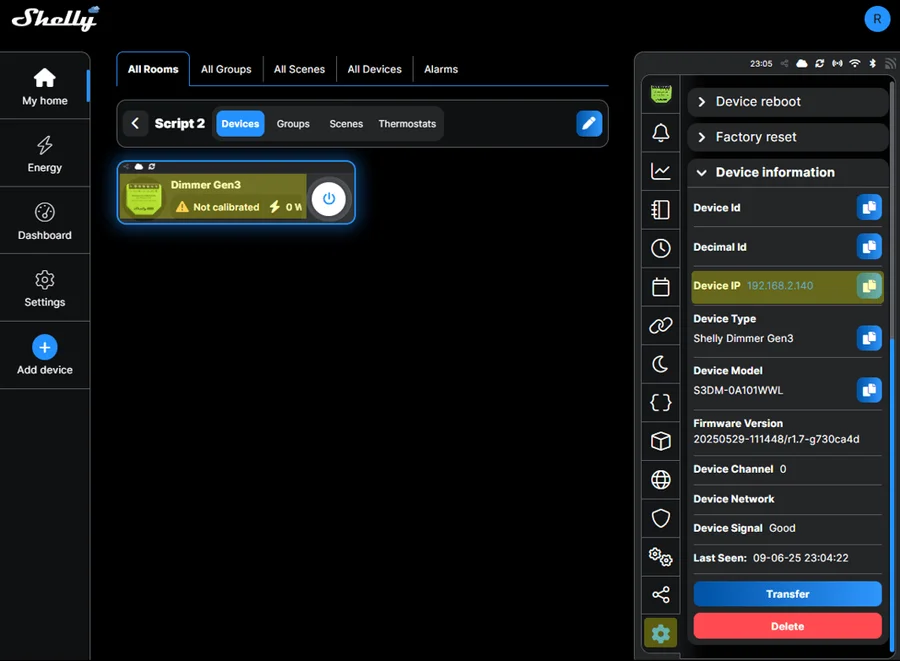
Then count the characters:
- 6 characters — an ID collision. Continue below.
- 12 characters — the ID is already long, so this is a genuine ownership problem. Contact Shelly support; they can release it.
Longify the ID
- Connect the device to your own Wi-Fi if it is not already
- On a battery device, wake it by pressing the reset button
- In a browser, open this address, replacing
DEVICE-IPwith the device’s address:
http:/longifyidThe device resets and reboots with a longer ID. Add it again as normal — see add a device.
Tips & best practices
- This is a Gen1 problem. Plus, Gen3 and Gen4 devices use longer IDs from the start and do not collide.
- A factory reset will not fix it. The ID is the problem, and a reset does not change the ID.
- Buying second-hand? Ask the seller to remove the device from their account before you collect it. It costs them ten seconds and saves you a support ticket.
- Selling or handing over a device? Do the same in reverse — release it from your account, not just from the wall.